Well done for finding them
Ragnarok Online (BukakkeRO)
Moderator: Forum Moderators
-
Dr. kitteny berk
- Morbo

- Posts: 19676
- Joined: December 10th, 2004, 21:53
- Contact:
-
Dr. kitteny berk
- Morbo

- Posts: 19676
- Joined: December 10th, 2004, 21:53
- Contact:
accounts can be made by login in with
for male
and for female:
on next login you can just use:
Code: Select all
accountname: requestedaccountname_M
password: requestedpasswordand for female:
Code: Select all
accountname: requestedaccountname_F
password: requestedpassword
Code: Select all
accountname: requestedaccountname
password: requestedpassword-
Grimmie
- Master of Soviet Propaganda

- Posts: 7672
- Joined: February 5th, 2005, 19:00
- Location: Birming-humm, England
- Contact:
How to get BukakkeRO Working
(TESTED!)
Okay, keep checking back here, and wait for the big red text at the top to turn Green,
'cause I'm sure I'll keep revising this list. Only when it says "Complete" should you
start doing this stuff. A'ight?
[EDIT START]
These are from an unassociated download mirror, so installing a download mannager like
GETRIGHT would be a good idea. Otherwise you'll be downloading these collosal files
for seven-hours each. Getright alledgedly allows four download connections at
once. So go and grab it as soon as you can, before downloading!
[EDIT END]
Step 1 )
Download KRO
This is the Korean version of the game.
Step 2 )
Download Sakray
This is the testserver content the greedy Koreans get before anyone else in the world
So we get all the latest stuff.
Step 3 )
Install KRO, and then Sakray, in that order.
The installation menus arent too difficult to figure out - When you have three buttons
at the bottom you have to click the leftmost button, and the middle one will be clickable.
I'm guessing that's the equivalent of an "Accept" button to the eula. Just pretend you can
read korean and finish the installation.
Step 4 )
Install the English Patch doohickey
This will mean you can stop trying to guess what buttons mean when you head off to the
autopatchers in a moment. It should be a case of running the program, choosing where
you installed the game, and letting it do it's stuff. Piece of piss.
Step 5 )
Patch KRO
Go to where you installed the game (C:\Program Files\Gravity\RO) and run "Ragnarok.exe"
A Korean autopatcher should pop up, and a green progress bar should zip around on the
bottom for a good while. Wait till all it shows is "?????????" and then click the far right
button. That will close that patcher.
Step 6 )
Patch Sakray
Now do the same with "sakray.exe".
Step 7 )
No kidding, repeat Step 5 and Step 6.
VERY IMPORTANT. Some KRO Patch data wont download unless Sakray is fully patched,
and vice versa. So make sure you patch both of them twice, or three times.
Step 8 )
Modify "Sclientinfo.xml"
Go to your data folder (C:\Program Files\Gravity\RO\data) and open Sclientdata.xml
with something like NOTEPAD. Replace the whole lot with the following code.
<?xml version="1.0" encoding="euc-kr" ?>
<clientinfo>
<servicetype>korea</servicetype>
<servertype>sakray</servertype>
<connection>
<display>Bukkake</display>
<desc>None</desc>
<address>217.112.95.67</address>
<port>6900</port>
<version>20</version>
<langtype>8</langtype>
<registrationweb></registrationweb>
<aid><admin></admin></aid>
</connection>
</clientinfo>
Then save it.
(Ps. This IS a code.)
Step 9 )
Open the English version of RO
Go to your start menu and choose "Ragnarok Online (English)" OR go to the folder
you installed it in and open "Run RO.exe".
Step 10 )
Refer to Berk's above post on how to make a character
Step 11 )
Enjoy! Everything should be working fine. Do the tutorial and talk to everyone on your
way around, it's the only way to get really fancy items early on in the game. Good luck!
(TESTED!)
Okay, keep checking back here, and wait for the big red text at the top to turn Green,
'cause I'm sure I'll keep revising this list. Only when it says "Complete" should you
start doing this stuff. A'ight?
[EDIT START]
These are from an unassociated download mirror, so installing a download mannager like
GETRIGHT would be a good idea. Otherwise you'll be downloading these collosal files
for seven-hours each. Getright alledgedly allows four download connections at
once. So go and grab it as soon as you can, before downloading!
[EDIT END]
Step 1 )
Download KRO
This is the Korean version of the game.
Step 2 )
Download Sakray
This is the testserver content the greedy Koreans get before anyone else in the world
So we get all the latest stuff.
Step 3 )
Install KRO, and then Sakray, in that order.
The installation menus arent too difficult to figure out - When you have three buttons
at the bottom you have to click the leftmost button, and the middle one will be clickable.
I'm guessing that's the equivalent of an "Accept" button to the eula. Just pretend you can
read korean and finish the installation.
Step 4 )
Install the English Patch doohickey
This will mean you can stop trying to guess what buttons mean when you head off to the
autopatchers in a moment. It should be a case of running the program, choosing where
you installed the game, and letting it do it's stuff. Piece of piss.
Step 5 )
Patch KRO
Go to where you installed the game (C:\Program Files\Gravity\RO) and run "Ragnarok.exe"
A Korean autopatcher should pop up, and a green progress bar should zip around on the
bottom for a good while. Wait till all it shows is "?????????" and then click the far right
button. That will close that patcher.
Step 6 )
Patch Sakray
Now do the same with "sakray.exe".
Step 7 )
No kidding, repeat Step 5 and Step 6.
VERY IMPORTANT. Some KRO Patch data wont download unless Sakray is fully patched,
and vice versa. So make sure you patch both of them twice, or three times.
Step 8 )
Modify "Sclientinfo.xml"
Go to your data folder (C:\Program Files\Gravity\RO\data) and open Sclientdata.xml
with something like NOTEPAD. Replace the whole lot with the following code.
<?xml version="1.0" encoding="euc-kr" ?>
<clientinfo>
<servicetype>korea</servicetype>
<servertype>sakray</servertype>
<connection>
<display>Bukkake</display>
<desc>None</desc>
<address>217.112.95.67</address>
<port>6900</port>
<version>20</version>
<langtype>8</langtype>
<registrationweb></registrationweb>
<aid><admin></admin></aid>
</connection>
</clientinfo>
Then save it.
(Ps. This IS a code.)
Step 9 )
Open the English version of RO
Go to your start menu and choose "Ragnarok Online (English)" OR go to the folder
you installed it in and open "Run RO.exe".
Step 10 )
Refer to Berk's above post on how to make a character
Step 11 )
Enjoy! Everything should be working fine. Do the tutorial and talk to everyone on your
way around, it's the only way to get really fancy items early on in the game. Good luck!
Last edited by Grimmie on December 19th, 2005, 10:12, edited 6 times in total.
-
Roman Totale
- Robotic Bumlord

- Posts: 8475
- Joined: October 24th, 2004, 0:27
- Location: Manchester, UK
-
ProfHawking
- Zombie

- Posts: 2101
- Joined: February 20th, 2005, 21:31
-
Joose
- Turret

- Posts: 8090
- Joined: October 13th, 2004, 14:13
- Location: The house of Un-Earthly horrors
This working is good.
Followed the instructions, everything worked fine. Well, I had to download Sakray twice, as the original download was fubar, but other than that, no problems.
2 things to note:
1)the autopatcher actually starts off with ?????????? as well, and can sit there for a second or two before actually patching. Just so you know. Also, when it has finished, it shows "?? ?? ??". Not being pedantic, just clarifying :D
2)Mine only appeared to need the one patching session for each program. Dunno why, but there you go.
One last thing: can you clarify the making of characters/accounts? Are we all using the one account, or something? I dont get it.
EDIT: ok, im a retard. For any other retards out there, what Berk means, is when you first log in, you put whatever you want to be your username followed by a _M for male and _F for female. Then whatever you want to be your password. Not, as I did, type in what berk posted word for word.
Followed the instructions, everything worked fine. Well, I had to download Sakray twice, as the original download was fubar, but other than that, no problems.
2 things to note:
1)the autopatcher actually starts off with ?????????? as well, and can sit there for a second or two before actually patching. Just so you know. Also, when it has finished, it shows "?? ?? ??". Not being pedantic, just clarifying :D
2)Mine only appeared to need the one patching session for each program. Dunno why, but there you go.
One last thing: can you clarify the making of characters/accounts? Are we all using the one account, or something? I dont get it.
EDIT: ok, im a retard. For any other retards out there, what Berk means, is when you first log in, you put whatever you want to be your username followed by a _M for male and _F for female. Then whatever you want to be your password. Not, as I did, type in what berk posted word for word.
-
Grimmie
- Master of Soviet Propaganda

- Posts: 7672
- Joined: February 5th, 2005, 19:00
- Location: Birming-humm, England
- Contact:
Not entirely sure who's in charge of scripts and coding around here - But I'd really like to implement some NPC's in an around the game, when we have half a chance.
I've been looking through the forums and found some pretty decent tutorials on making custom npc scripts, and implementing them. Let's see.
How to write NPC Scripts
How to implement NPC Scripts
A list of NPC sprites
A list of scripts
And finally..
A ready-made Healer script
I've been looking through the forums and found some pretty decent tutorials on making custom npc scripts, and implementing them. Let's see.
How to write NPC Scripts
How to implement NPC Scripts
A list of NPC sprites
A list of scripts
And finally..
A ready-made Healer script
-
Grimmie
- Master of Soviet Propaganda

- Posts: 7672
- Joined: February 5th, 2005, 19:00
- Location: Birming-humm, England
- Contact:
I'm now fiddling around with RO's guts.
Changes made:
- No spellcasting delay
- Dropped items scoop to inv automatically
- Base and Job level rates set to x3 (Three times faster leveling)
- No death experience penalty
- Players respawn with full Hp/SP
- Players can level up more than once per kill
- Enabled Card remover NPC
- Enabled Bank NPC
- Enabled Reset NPC
- Enabled City/Dungeon warper NPCs
- Enabled Stylist NPC
Changes made:
- No spellcasting delay
- Dropped items scoop to inv automatically
- Base and Job level rates set to x3 (Three times faster leveling)
- No death experience penalty
- Players respawn with full Hp/SP
- Players can level up more than once per kill
- Enabled Card remover NPC
- Enabled Bank NPC
- Enabled Reset NPC
- Enabled City/Dungeon warper NPCs
- Enabled Stylist NPC
That would be appriciated. Also, are there any pre-requesits I need to fill to become an archer?Grimmie wrote:I'll show you around.
Payon can be.. Uh. Complicated.
You need to go through the north exit of payon, and then talk to the guide, he can put a little crosshair on your minimap where the archers guild is - I swear you won't be able to miss it once you've found it.
-
Grimmie
- Master of Soviet Propaganda

- Posts: 7672
- Joined: February 5th, 2005, 19:00
- Location: Birming-humm, England
- Contact:
BukakkeRO
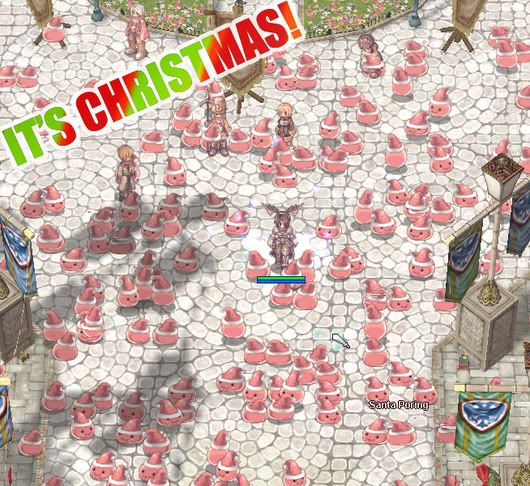
CHRISTMAS EVENT
<img src="http://img.photobucket.com/albums/v241/ ... orings.jpg" alt="Image hosted by Photobucket.com">
I'll be giving out christmas items on request, and gift-boxes which generate random items.
Just give me a call and I'll hop and and give you some stuff
Also, would anyone be interested
in playing some mini-games later? Such as scavenger hunting or hide and seek?
CHRISTMAS EVENT
<img src="http://img.photobucket.com/albums/v241/ ... orings.jpg" alt="Image hosted by Photobucket.com">
I'll be giving out christmas items on request, and gift-boxes which generate random items.
Just give me a call and I'll hop and and give you some stuff
in playing some mini-games later? Such as scavenger hunting or hide and seek?
-
Woo Elephant Yeah
- Heavy

- Posts: 5433
- Joined: October 10th, 2004, 17:36
- Location: Bristol, UK
- Contact: