
Raven Shield
Moderator: Forum Moderators
-
Dr. kitteny berk
- Morbo

- Posts: 19676
- Joined: December 10th, 2004, 21:53
- Contact:
-
Fred Woogle
- Zombie

- Posts: 2172
- Joined: January 12th, 2005, 21:42
- Location: Inside the closet cupcake!
- Contact:
-
Dr. kitteny berk
- Morbo
- Posts: 19676
- Joined: December 10th, 2004, 21:53
- Contact:
-
FatherJack
- Site Owner

- Posts: 9597
- Joined: May 16th, 2005, 15:31
- Location: Coventry, UK
- Contact:
Code: Select all
OS: Windows NT 6.0 (Build: 6001)
CPU: GenuineIntel PentiumPro-class processor @ 2400 MHz with 4093MB RAM
Video: NVIDIA GeForce GTX 280 (8122)

General protection fault!

History: UGameEngine::Draw <- UWindowsViewport::Repaint <- UWindowsClient::Tick <- ClientTick <- UGameEngine::Tick <- UpdateWorld <- MainLoopNOD32 gave no notifications about the EXEs, disabling it and verifying didn't fix it. Running in compatibility mode didn't help, as it applies to the Steam EXE, but will look into applying it to the ravenshield.exe specifically.
Actually if you non-Steam CD copy-owning guys could post your Athena Sword shortcuts, that would be really helpful.
-
Dr. kitteny berk
- Morbo
- Posts: 19676
- Joined: December 10th, 2004, 21:53
- Contact:
-
deject
- Berk

- Posts: 10353
- Joined: December 7th, 2004, 17:02
- Location: Oklahoma City, OK, USA
- Contact:
I was having this problem when I was using Windows XP. I think it's DirectX 9 related because now that I'm on Fista and DX 10 the game runs fine.FatherJack wrote:Was the error I was getting whenever switching to full screen. Could run in a window, but no way to move the window so half of it wasn't hanging off the screen.Code: Select all
OS: Windows NT 6.0 (Build: 6001)
CPU: GenuineIntel PentiumPro-class processor @ 2400 MHz with 4093MB RAM
Video: NVIDIA GeForce GTX 280 (8122)

General protection fault!

History: UGameEngine::Draw <- UWindowsViewport::Repaint <- UWindowsClient::Tick <- ClientTick <- UGameEngine::Tick <- UpdateWorld <- MainLoop
NOD32 gave no notifications about the EXEs, disabling it and verifying didn't fix it. Running in compatibility mode didn't help, as it applies to the Steam EXE, but will look into applying it to the ravenshield.exe specifically.
Actually if you non-Steam CD copy-owning guys could post your Athena Sword shortcuts, that would be really helpful.
-
FatherJack
- Site Owner
- Posts: 9597
- Joined: May 16th, 2005, 15:31
- Location: Coventry, UK
- Contact:
-
FatherJack
- Site Owner
- Posts: 9597
- Joined: May 16th, 2005, 15:31
- Location: Coventry, UK
- Contact:
-
Dr. kitteny berk
- Morbo
- Posts: 19676
- Joined: December 10th, 2004, 21:53
- Contact:
-
FatherJack
- Site Owner
- Posts: 9597
- Joined: May 16th, 2005, 15:31
- Location: Coventry, UK
- Contact:
-
HereComesPete
- Throbbing Cupcake

- Posts: 10249
- Joined: February 17th, 2007, 23:05
- Location: The maleboge
Variety of ideas from trolling the webernets -
1 - drivers.
2 - set the game to run one one core of a multi-core cpu.
3 - any overclocking (even low level automatic system stuff) should be told to stop it.
4 - administrator mode for install and game exe.
5 - disable uac completely.
6 - unlock the proper admin mode that Fista has. (I posted how to do this a while ago, couldn't tell you the thread name though )
)
7 - Punkbuster being spazzy with it at startup, causing the errorz. Update it for raven shield.
8 - Have a read of [url=http://www.computerhope.com/issues/ch000224.htm]this[/url. It's very basic but has a few more ideas.
9 - make sure everything points at the right place. I found that the Athena Sword mod for the steam version has a play now thing that might be a separate exe but it goes nowhere in my install and has no extension for the file type. I then checked xfire and found xfire was looking in my C drive at a red storm entertainment file that didn't exist. The mod is of course on a different drive in steam apps.
FJ - did you say on TS that vanilla raven shield does the GPF as well? I seem to recall you said you'd tried both and they both threw a joey.
1 - drivers.
2 - set the game to run one one core of a multi-core cpu.
3 - any overclocking (even low level automatic system stuff) should be told to stop it.
4 - administrator mode for install and game exe.
5 - disable uac completely.
6 - unlock the proper admin mode that Fista has. (I posted how to do this a while ago, couldn't tell you the thread name though
)7 - Punkbuster being spazzy with it at startup, causing the errorz. Update it for raven shield.
8 - Have a read of [url=http://www.computerhope.com/issues/ch000224.htm]this[/url. It's very basic but has a few more ideas.
9 - make sure everything points at the right place. I found that the Athena Sword mod for the steam version has a play now thing that might be a separate exe but it goes nowhere in my install and has no extension for the file type. I then checked xfire and found xfire was looking in my C drive at a red storm entertainment file that didn't exist. The mod is of course on a different drive in steam apps.
FJ - did you say on TS that vanilla raven shield does the GPF as well? I seem to recall you said you'd tried both and they both threw a joey.
-
FatherJack
- Site Owner
- Posts: 9597
- Joined: May 16th, 2005, 15:31
- Location: Coventry, UK
- Contact:
Yep.HereComesPete wrote:FJ - did you say on TS that vanilla raven shield does the GPF as well? I seem to recall you said you'd tried both and they both threw a joey.
Tried different drivers, and I run logged in as Administrator all the time, no UAC. XFire needed manually setting up, the exe is still ravenshield.exe, but it also looks for \mods\AthenaSword.mod
Maximising through either method (ALT+ENTER, ALT+SPACE+X) crashes it immediately. Setting Processor affinity doesn't help either, my GPU is factory overclocked, but nothing else is AFAIK. Game EXE in comp mode didn't help either.
In case I wasn't clear, the GPF is not a Windows one, but one from the Unreal engine:
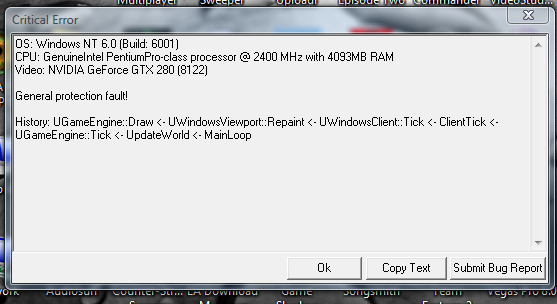
Only workaround is to play in a window, at a reduced resoultion, like 1440x900 and use ALT+SPACE, Move to stop it hanging off the screen.
-
Dr. kitteny berk
- Morbo
- Posts: 19676
- Joined: December 10th, 2004, 21:53
- Contact:
