Page 1 of 2
Power supply things
Posted: November 14th, 2009, 10:41
by fabyak
Right bitches, I need your help.
Basically new power supply has arrived and I now get lights on my MB and no bangs when I plug it in. However I appear to be a connector short. I have an Abit AB9 Pro and the code I'm getting tells me to 'Enable ATX Power Supply'
I need one of these to make the machine boot
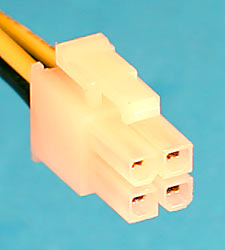
but the closest I have is this:

Plugging either of these in doesn't do anything (other than make it give me the same message)
Any ideas as to how I can get this working, if it's possible to get a convertor to fix this or am I going to have to bite the bullet and send the cocking thing back and get a refund and buy one that fits me board properly?
Ta!
[edit] Looking at my cooked PSU it appears to have had the same plugs on it and worked without problems

Oh yeah, the PSU I now have is this one
http://www.ebuyer.com/product/150985
Posted: November 14th, 2009, 10:44
by Imperatore
Well those two you have reminds me of the two purely for my graphics card. Which PSU do you have?
Posted: November 14th, 2009, 10:45
by fabyak
Posted: November 14th, 2009, 10:49
by Imperatore
Edit: Do you not have a single 4 bit with the big 20 pin?
Posted: November 14th, 2009, 11:20
by fabyak
Yep, that's going into the main socket.
Posted: November 14th, 2009, 11:25
by Imperatore
Wow, this is really unhelpfull but I'm positive I had this same issue. Just gonna open up my pc and look because I may have been given an adapter of sorts. I know the 2x 4 pins I had were different on the pins, eg cut off or square and iirc, they were not supposed to be pluged in.
I'll have a looksie inside.
Edit: Interestingly I found this. I don't mean to insult your intelligence but are you putting it on the right way?
http://forum.corsair.com/forums/showthread.php?t=76432
Posted: November 14th, 2009, 12:22
by fabyak
No insult taken! They're in the right way, tried it all the other ways and it only goes in the one way
Posted: November 14th, 2009, 12:43
by buzzmong
Have you got a multimeter (or a spare fan you don't mind risking damaging) ? Test the lines, black is negative, yellow is 5v iirc (might be 12v but I think that is red normally).
Could be a dead line if it's a brand new PSU.
Posted: November 14th, 2009, 13:29
by Dr. kitteny berk
it should just work using the plug on the left, tried swearing at it?
Posted: November 14th, 2009, 13:47
by Dog Pants
Do you have any jam?
Posted: November 14th, 2009, 15:18
by Baliame
If nothing else works, try the russian method. Drink vodka and hit it with a hammer. Always solves problems.
Posted: November 14th, 2009, 15:27
by Dr. kitteny berk
Baliame wrote:If nothing else works, try the russian method. Drink vodka and hit it with a hammer. Always solves problems.


That's what I do.
Posted: November 14th, 2009, 15:57
by Pnut
Baliame wrote:If nothing else works, try the russian method. Drink vodka and hit it with a hammer. Always solves problems.
And if it still doesn`t work get a bigger hammer
Posted: November 15th, 2009, 14:42
by fabyak
Right, I suspect there is a problem with the 4 pin block on the end of the 24 pin jobber so I've got a 20 - 24 converter on the way and see if that works and if it does I might hang on to the PSU and use it that way or send it back, not sure but I will let you know how I get on
Posted: November 16th, 2009, 12:41
by HereComesPete
What I think here is that the bottom picture you've put in the op shows the split atx connector and you need to plug the one on the left in to the mobo, the other one is the expandy bit for those mobo's that take 8 bits of pluggy-in-goodness. Possibly it wouldn't matter which one was plugged in because they're both capable (or should be) of supplying the necessary power.
I would imagine with it being corsair that the main mobo lead and the cpu cable are both cabled together and emerge out of the same hole (hur hur) in the psu. If this isn't working then your psu is likely shagged and you need to rma it.
It could be that your cpu or atx connector is/are in fact buggered as a result of the release of magic smoke and no amount of psu returns will get it going again.
Like buzz said, if you can get hold of a multimeter you can check the power in that cable, if it's there even without load, then the psu is fine. And you get to search for a different culprit, much like me.
Posted: November 20th, 2009, 16:27
by fabyak
Right, update tiem!
Good: 20-24 pin adapter turned up
Bad: Corsair still aint working with it
Good: Tried old 300W Tagan with it and it boots!
Bad: No PCI-E plug with it!
Good: Have old gfx card
Bad: No slotsto fit it in!
On closer inspection it appears that my 24 pin plug only has 23 pins in it

RMA tiem i think!
Posted: November 20th, 2009, 21:24
by fabyak
Oh yeah, meant to ask if anyone has seen this before or is it a cabling fuckup?
Posted: November 20th, 2009, 21:26
by Dr. kitteny berk
that's -5v, IIRC, not needed it since the 1800s or so.
Posted: November 21st, 2009, 1:28
by Davius
stop m,e if i'm being a drunken idiot, but after copious amount of drink and a drunken night out (now sat watching shitty children in need bbc and totally ready to rip my own head off grrrr) i remember that i have a perfectly good psu that sometimes decides not to work, but then does after leaving the power on for awhile, basically plug pc in... get fuck all reponse... to anything.... after 10-30 mins, try again and fine until next power cut, no idea of my prob solution, but have you tried leaving it plugged in for 30 mins? if it works after that we may be looking for the same solution
Posted: November 23rd, 2009, 12:11
by HereComesPete
Davius wrote:drunk stuff
Given I've swapped my psu and mobo and am currently suffering a very similar problem are you sure it's your psu? If you are then this could help me track down why my pc is being a fucker.