Useful tools and toys.
Posted: March 20th, 2006, 15:44
Just a Mind-dump of useful apps, didn't really want to put it into the essentials section, because mostly they're not, though a lot are great for admins or people who are the local geek.
I'll let some other fuck put this somewhere or make it neat, but still
Hardware Monitoring/ Tweaking
Coretemp
decent temp monitor, compatible with most modern CPUs.
http://www.thecoolest.zerobrains.com/CoreTemp/
CPU-Z
A CPU/Memory info tool.
http://www.cpuid.com/cpuz.php
PC Wizard
A Nicely featured System info gathering and benchmarking tool
http://www.cpuid.com/pcwizard.php
ClockGen
A Basic windows based overclocking app, allows you to get a good idea of how much overclocking you'll get away with, without having to arse about in the bios
http://www.cpuid.com/clockgen.php
SpeedFan
monitors voltages, fan speeds and temperatures in your computer, lets you. kinda handy now that MBM is long dead.
http://www.almico.com/speedfan.php
Windows Utils
Unlocker
Lets you delete files that are still being used by other processes.
http://ccollomb.free.fr/unlocker/
Eraser
Does proper secure multipass deleting, handy if you're selling HDDs or suchlike.
http://www.heidi.ie/eraser/
KeyFinder
Handy if you have to reinstall someones computer who can't find (or doesn't know) their windows key.
http://www.magicaljellybean.com/downloads/kf141.zip
mozbackup
Lets you back up all settings, info, faves and such for firefox, thunderbird and moz suite
http://mozbackup.jasnapaka.com/
nLite
Allows you to slipstream updates to a windows install, also lets you make it put the cd key in automatically (drivers are possible with work too)
www.nliteos.com
UDPixel
makes a majick flickering box that can help unstick pixels in LCD screens
http://udpix.free.fr/
Sequoia view
Tool that shows all your files visually as shiny boxes scaled relatively to one another according to file size.
http://www.win.tue.nl/sequoiaview/
Process Explorer
http://www.sysinternals.com/Utilities/P ... lorer.html
A much better replacement for Task Manager.
Crapcleaner
Good automagic cleaner-upper, very handy, but some of the advanced stuff can break stuff.
http://www.ccleaner.com/
Kaspersky online scanners
Basic online virus scanners
Kaspersky online single file scanner
Kaspersky online full virus scanner
The full scanner doesn't let you delete etc, but does let you know what/if is infucted.
Other handy stuff
Creative Driver ISOs
http://hosted.filefront.com/BadBoyforum
PSU calculator
Does what it says on the tin
http://www.extreme.outervision.com/psucalculator.jsp
Port checker
http://www.utorrent.com/testport.php?port=80
Gaming Related
Teamspeak Overlay
Lets you see who's talking in teamspeak while playing games
(Can be iffy with bf2 - see deject's post below)
www.teamspeakoverlay.com
Fraps
Allows you to record videos in games, demo is limited, but still handy
http://www.fraps.com/
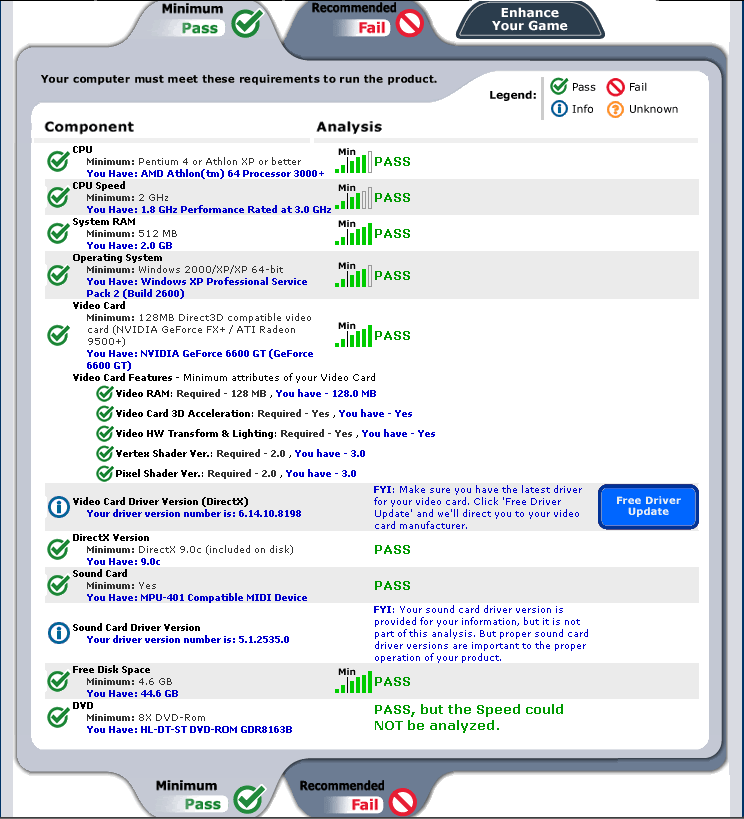
System Requirements Lab
A useful browser/java based application which tests your system components and compares them to both the minimum and recommended specifications for the selected game. It will tell you where you fall short, if at all.
http://www.systemrequirementslab.com/
Video Related
Dvd Region free
A software app that allows you to watch any region DVDs without having to flash the firmware on your drive.
www.dvdidle.com
dvdshrink
Easy and mostly automatic dvd compressor, best used with a blockbuster subscription
www.dvdshrink.org
Virtual Dub (Vdub)
A Basic, but powerful feature filled video compressing, transcoding and basic fettling app
http://virtualdub.org
Codecs
All pretty self explanatory
http://www.free-codecs.com/download/Qui ... native.htm
http://www.free-codecs.com/download/Rea ... native.htm
http://ac3filter.sourceforge.net/
http://www.koepi.org/xvid.shtml
I'll let some other fuck put this somewhere or make it neat, but still
Hardware Monitoring/ Tweaking
Coretemp
decent temp monitor, compatible with most modern CPUs.
http://www.thecoolest.zerobrains.com/CoreTemp/
CPU-Z
A CPU/Memory info tool.
http://www.cpuid.com/cpuz.php
PC Wizard
A Nicely featured System info gathering and benchmarking tool
http://www.cpuid.com/pcwizard.php
ClockGen
A Basic windows based overclocking app, allows you to get a good idea of how much overclocking you'll get away with, without having to arse about in the bios
http://www.cpuid.com/clockgen.php
SpeedFan
monitors voltages, fan speeds and temperatures in your computer, lets you. kinda handy now that MBM is long dead.
http://www.almico.com/speedfan.php
Windows Utils
Unlocker
Lets you delete files that are still being used by other processes.
http://ccollomb.free.fr/unlocker/
Eraser
Does proper secure multipass deleting, handy if you're selling HDDs or suchlike.
http://www.heidi.ie/eraser/
KeyFinder
Handy if you have to reinstall someones computer who can't find (or doesn't know) their windows key.
http://www.magicaljellybean.com/downloads/kf141.zip
mozbackup
Lets you back up all settings, info, faves and such for firefox, thunderbird and moz suite
http://mozbackup.jasnapaka.com/
nLite
Allows you to slipstream updates to a windows install, also lets you make it put the cd key in automatically (drivers are possible with work too)
www.nliteos.com
UDPixel
makes a majick flickering box that can help unstick pixels in LCD screens
http://udpix.free.fr/
Sequoia view
Tool that shows all your files visually as shiny boxes scaled relatively to one another according to file size.
http://www.win.tue.nl/sequoiaview/
Process Explorer
http://www.sysinternals.com/Utilities/P ... lorer.html
A much better replacement for Task Manager.
Crapcleaner
Good automagic cleaner-upper, very handy, but some of the advanced stuff can break stuff.
http://www.ccleaner.com/
Kaspersky online scanners
Basic online virus scanners
Kaspersky online single file scanner
Kaspersky online full virus scanner
The full scanner doesn't let you delete etc, but does let you know what/if is infucted.
Other handy stuff
Creative Driver ISOs
http://hosted.filefront.com/BadBoyforum
PSU calculator
Does what it says on the tin
http://www.extreme.outervision.com/psucalculator.jsp
Port checker
http://www.utorrent.com/testport.php?port=80
Gaming Related
Teamspeak Overlay
Lets you see who's talking in teamspeak while playing games
(Can be iffy with bf2 - see deject's post below)
www.teamspeakoverlay.com
Fraps
Allows you to record videos in games, demo is limited, but still handy
http://www.fraps.com/
System Requirements Lab
A useful browser/java based application which tests your system components and compares them to both the minimum and recommended specifications for the selected game. It will tell you where you fall short, if at all.
http://www.systemrequirementslab.com/
Video Related
Dvd Region free
A software app that allows you to watch any region DVDs without having to flash the firmware on your drive.
www.dvdidle.com
dvdshrink
Easy and mostly automatic dvd compressor, best used with a blockbuster subscription
www.dvdshrink.org
Virtual Dub (Vdub)
A Basic, but powerful feature filled video compressing, transcoding and basic fettling app
http://virtualdub.org
Codecs
All pretty self explanatory
http://www.free-codecs.com/download/Qui ... native.htm
http://www.free-codecs.com/download/Rea ... native.htm
http://ac3filter.sourceforge.net/
http://www.koepi.org/xvid.shtml


 this
this (looks at Prof)