Page 1 of 1
CSS probs with 2 peepholes on same connection
Posted: September 4th, 2007, 9:14
by w3rthers
Just moved in to my new flat and installed steam restored everything downloaded updates for CSS. I can play fine but when my flatmate starts up CSS I get connection problems, is this a CSS problem or a connection problem havnt tried any others because CSS is the one we both play and have installed will try the b33f and future b33f tonight to see if its connection problems or just steam.
Ta for any help
Posted: September 4th, 2007, 9:31
by Dr. kitteny berk
hmm. weird.
I assume you've tried playing on the same, and different servers?
I wonder if there's some issue where both of your steam accounts are trying to use the same ports and stuff. or something. Maybe try deleting ClientRegistry.blob from C:\Program Files\Steam
Posted: September 4th, 2007, 10:38
by w3rthers
Cheers will deffo try that out.
It's not even when he joins servers its when he loads it up it does it so that got me thinking it was a steam issue not a connection prob.
Posted: September 4th, 2007, 10:46
by fabyak
I find that starting up CSS makes my connection for everything else crap itself and the same for when I close it (for about 20 or 30s or so after) so it may well be CSS
Posted: September 4th, 2007, 11:10
by w3rthers
Had a bit of a arse getting it working to start with had to uninstall and reinstall cuz it just froze when I loaded it up but I think it did that cuz I put the wrong password in but dunno for sure.
Hmm will look at steam support thing see if thats got owt on.
Ta's for the replies

Posted: September 4th, 2007, 11:16
by w3rthers
hmm might try plugging us both directly in to the modem bypassing the router dunno why I didnt think of that before then I'll know if its the router or not.
Edit: found this on steam
Slow Down Steam to Test
Slowing down the Steam internet connection rate to "modem" speeds may help your problem. Setting your rate too high may overload your modem or router or internet connection and cause this problem.
This can be especially true if you have a number of computers online behind one modem (like a home LAN event or CyberCafe).
will check if wires (he just joined 5punk last night) has got his speed set high
Posted: September 4th, 2007, 12:32
by Wires
K, just having a look now. We wouldnt both be able to hook up directly to the modem as it only has one connection, hence the router. We could try both hooking up using ethernet cables and see how that fares... I'm just messing on with the steam support section now to see if I have properly opened all the ports ect
Posted: September 4th, 2007, 12:37
by Dr. kitteny berk
can you get hold of a switch for testing? (wouldn't suggest buying one as you might not have any luck)
you should be able to share the modem using a switch.
Posted: September 4th, 2007, 13:24
by FatherJack
You normally need a switch, a hub would work but is crap. Otherwise your packets will just collide all over the place and mess up the whole connection.
Something like this:
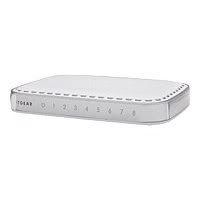
10/100MB from a tenner, 1GB from about £20
Not sure why the router isn't doing this job for you, though - it should do.
Posted: September 4th, 2007, 13:26
by Dr. kitteny berk
FatherJack wrote:Not sure why the router isn't doing this job for you, though - it should do.
It's possible the router and modem are arguing about stuff. which may also cause issues.
Posted: September 4th, 2007, 14:53
by w3rthers
Wires is on wireless and I'm on wires (yeah he's my bitch!

)
Posted: September 4th, 2007, 15:33
by Wires
w3rthers wrote:Wires is on wireless and I'm on wires (yeah he's my bitch!
)

Posted: September 4th, 2007, 16:22
by w3rthers
yeah! im a squirrel now and your my squirrel bitch!
Posted: September 11th, 2007, 10:26
by HereComesPete
Me and KV managed to get css working fine from one location, we did have specified ip's, you may need to set your router to assign specific, constant (fake, post router) ip's to your different machines, as it started to go a little funny when I had an auto-assigned ip. It did blind one of us occasionally for ghosting, but that was inconsistent and minimal.
Posted: September 13th, 2007, 23:28
by Killavodka
HereComesPete wrote:you may need to set your router to assign specific, constant (fake, post router) ip's
You mean the LAN IP

That might help, turn off the automatic IP selection (DHCP i believe) and input your own, Usually 192.168.0.xx. Your router will probably have 192.168.0.1 so any after that should work.
Change it locally by going on to the properties of your connection, Scroll down to Internet Protocol, then properties again. Should look something like this:
192.168.0.2 (Your LAN IP)
255.255.255.0 (default subnet mask)
192.168.0.1 (The gateway to the Interwebs, Should be same as your router)
Not sure it matters about the DNS because the router does all that.
Killavodka accepts no responsability for assplosions
Posted: September 14th, 2007, 0:22
by Fear
I've had this in the past, and found it only affected some servers - which was weird. Then it stopped entirely. This was with DOD:Source.
If you are using NAT (you almost certainly are) it is possible the router that is doing this for you can't keep track of which sessions belong to which LAN IPs and such. If you have a 'spare' broadband router kicking about then try that.